
nf-core/ampliseq pipeline
Introduction
The nf-core/ampliseq pipeline originates from the nf-core community, which is dedicated to building and sharing bioinformatics pipelines managed with Nextflow. It performs amplicon sequencing and denoising; in addition, it can use various databases for taxonomic assignment (including databases for 16S, ITS, CO1, and 18S sequences). The pipeline supports data originating from Illumina, PacBio and IonTorrent devices.
The version of the nf-core/ampliseq pipeline available on GenPat is 2.7.1.
Official page of version 2.7.1 of nf-core/ampliseq on the "nf-core community" website: https://nf-co.re/ampliseq/2.7.1.
nf-core/ampliseq GitHub page: https://github.com/nf-core/ampliseq.

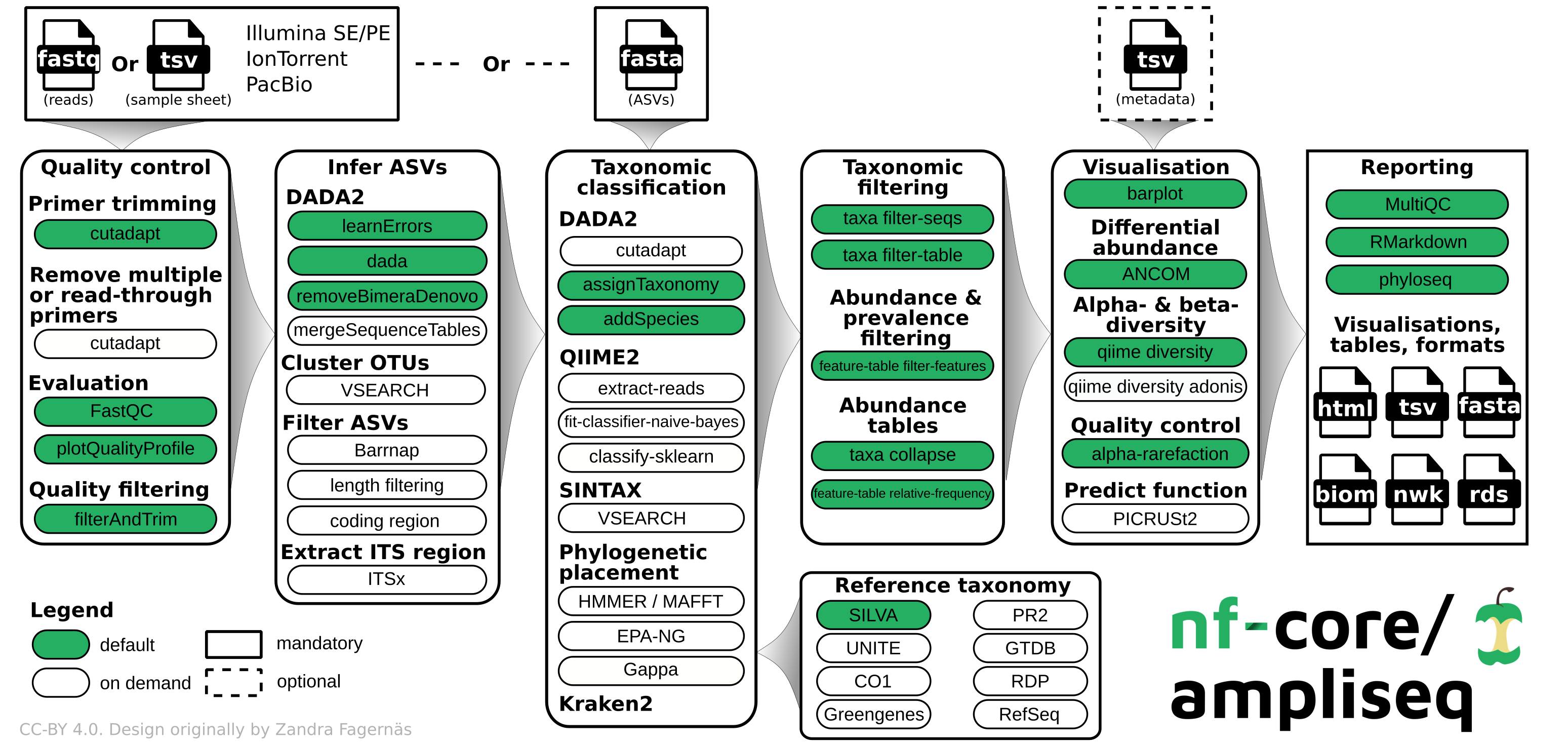 Image property of ©nf-core: https://nf-co.re/ampliseq/2.7.1.
The default analyses of nf-core/ampliseq (shown in green in the image above) are the ones executed in GenPat. Some of the on-demand analyses can be added using the additional parameters in Launch Analysis; moreover, some default analyses can be skipped, also using the additional parameters. It is recommended to consult the "parameters" and "parameters: skipping specific steps" sections of the nf-core/ampliseq official guide to make the best use of the additional parameters and the text field for shell-like parameters.
Run nf-core/ampliseq pipeline
TThe filter at the top of the run analysis page allows to display only the pipelines. Once the nf-core/ampliseq pipeline has been selected, a confirmation interface will be displayed.
The steps of the pipeline are summarized in the diagram at the top of the page.
The pipeline supports sequence files generated by Illumina, IonTorrent or PacBio sequencing devices:
The input selection interface provides the advanced input selection mode, to allow the use of inputs processed by different methods that were applied upstream in the analysis workflow.
Additional parameters
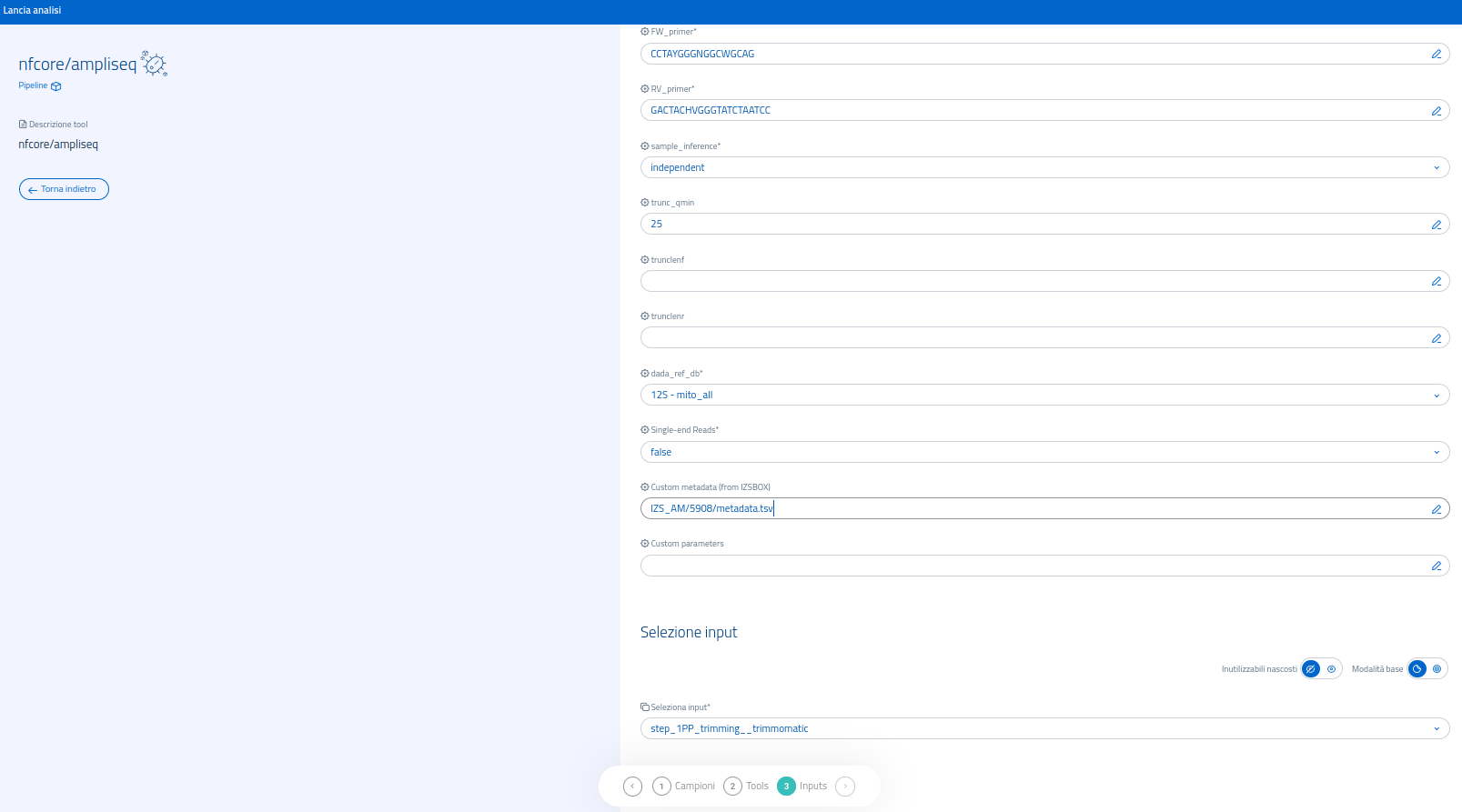
The following list refers to the additional parameters, available in the dedicated section of the launch system:
FW_primerandRV_primer: text fields in which to paste the sequence of the forward primers and reverse primers, respectively; this is a necessary step for the trimming of the primers;sample_inference: inference mode for ASV calculation:independent: fast mode, faster and lighter, but with lower sensitivity”;pooled: "performance" mode, with a higher sensitivity but heavier to run;pseudo: (e.i. pseudo-pooled), "balanced mode";
trunclenf,trunclenrandtrunc_qmin: the denoising step requires reads of equal length. The truncation parameters are text fields where you have to manually specify the nucleotide position to be used as the cutoff value for the forward read (trunclenf) and for reverse read (trunclenr). Longer sequences are truncated whereas shorter ones are discarded.trunc_qminallows to specify a quality minimum value for the nucleotide call: iftrunclenfandtrunclenrare not provided, cutoff values are determined automatically, truncating when the median value of the quality score falls below the specified cutoff threshold.dada_ref_db: selection of the database used by DADA2 for taxonomic assignment (in GenPat, the 12S rRNA “mito-all” database and the 16S rRNA “silva” database are currently available).Reads: selection of the read type (paired-end or single-end).Custom metadata (from IZSBOX): it allows you to specify a metadata file present in your IZSbox (to paste the file path).Custom parameters: the other parameters of nf-core/ampliseq are available as modifiers to be entered in the text field as terminal commands. The official guide contains all the necessary information.
Please consult the parameter descriptions directly in the official nf-core/ampliseq guide: https://nf-co.re/ampliseq/2.7.1/parameters.
Once the pipeline is launched, the page generates a link to the Check analysis section to allow a check of the processus status. The user will be notified by the system both when the pipeline is successfully launched and when the operation is completed.
Result folder
The summary card of a successfully completed pipeline allows access to the results folder, enabling you to retrieve tabular files and graph images; it also provides direct links for viewing images and reports.
The Result folder can be accessed by clicking the link in the analysis card, in the Result data section. Within the following results folder, it is possible to find the files produced by the nf-core/ampliseq pipeline.
The table below shows the list of the main folders and their contents, along with some useful information.
| Folder | Content |
|---|---|
results/ |
software subfolders and summary table (overall_summary.tsv) |
results/cutadapt |
cutadapt logs (DSXXXXXXXX.trimmed.cutadapt.log) and summary table (cutadapt_summary.tsv) |
results/dada2 |
.tsv tables of DADA2 statistics, the identified ASVs, and the FASTA file of the ASV sequences (ASV_seqs.fasta) |
results/dada2/QC |
quality check graphs in .pdf format |
results/input |
metadata file (metadata.tsv) |
results/multiqc |
multiQC report in .html format, output data folder and MultiQC graph folder |
results/qiime |
folders of the data produced by QIIME: abundance_tables, alpha-rarefaction, barplot, diversity, phylogenetic_tree, rel_abundance_tables, representative_sequences |
results/summary_report |
graphs in .svg image format and report in .html format |