
2AS_denovo
Introduction
2AS_denovo analysis performs the de novo assembly of sequences, producing the genome's scaffolds.

Run 2AS_denovo analysis
Once the analysis 2AS_denovo has been selected in the dedicated run analyses page, it will be possible to choose the bioinformatics software ("method") to use, among those available for the analysis. The available tools in this case are:
-
SPAdes - St. Petersburg genome assembler.
SPAdes GitHub page: https://github.com/ablab/spades
-
Unicycler - hybrid assembly pipeline for bacterial genomes.
Unicycler GitHub page: https://github.com/rrwick/Unicycler
-
shovill - a pipeline for assembly of bacterial isolate genomes from Illumina paired-end reads.
Shovill GitHub page: https://github.com/tseemann/shovill
-
Flye - de novo assembler for single-molecule sequencing reads
Flye GitHub page: https://github.com/fenderglass/Flye
-
plasmidSPAdes - St. Petersburg genome assembler for bacterial plasmid assembly.
PlasmidSPAdes GitHub page: https://github.com/ablab/spades
Note: the tool Flye is exclusively dedicated to the assembly of long reads generated by Oxford Nanopore devices; the tool plasmidSPAdes is an iteration of SPAdes designed for the use with plasmids.
The input selection interface provides the advanced input selection mode, to allow the use of inputs processed by different methods that were applied upstream in the analysis workflow.
Accepted inputs can originate from:
- step_1PP_trimming
- step_1PP_hostdepl
- step_1PP_downsampling
- step_1PP_generated
- step_3TX_class
- step_4AN_AMR
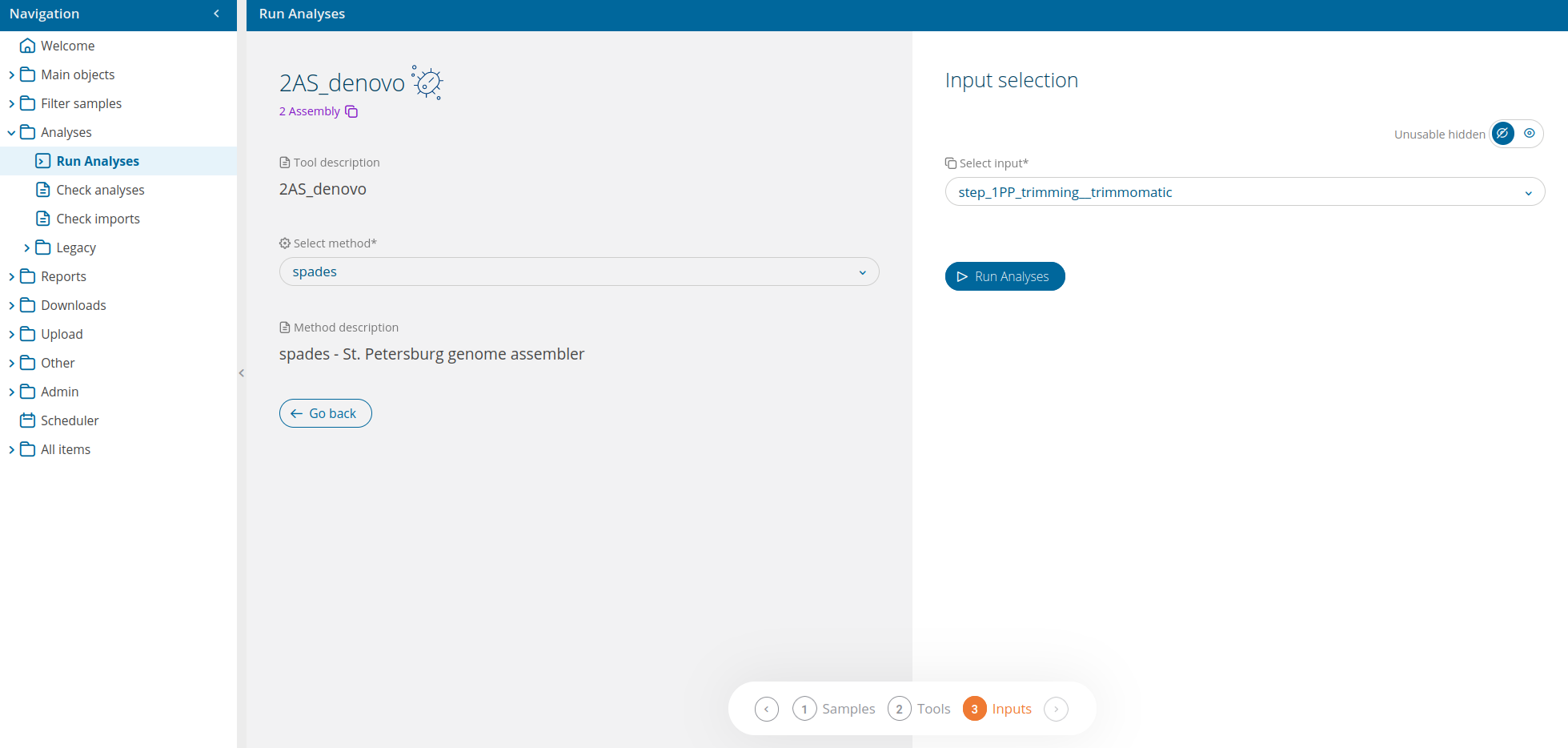
Once the analysis is launched, the page generates a link to the Check analysis section to allow a check of the processus status. The system will send the user a notification both when the analysis is successfully started and when the operation is completed.
Result folder
To consult the guide on how to download files from the platform, please refer to the dedicated page.
The Result folder can be browsed by clicking the link available within the analysis card, in the Result data section. Inside the subsequent results folder, there are 3 subfolders:
- meta: (metadata), where the log and configuration files of the executed process are saved;
- qc: (quality check) where check quality files are saved. It also contains the two sub-folders meta and result. For this analysis, quality check is performed with quast;
- result: where the files containing the results produced by the analysis are saved.
The tables below show the lists of files present in the folders, along with some useful information.
SPAdes
| File | Description | Location |
|---|---|---|
| DSXXXXXXXX-DTXXXXXX_ID_spades_contigs.fasta | file of contigs from the de novo assembly | folder: result |
| DSXXXXXXXX-DTXXXXXX_ID_spades_scaffolds.fasta | file of the scaffolds | folder: result |
| DSXXXXXXXX-DTXXXXXX_ID_spades_scaffolds_L200.fasta | file containing scaffolds longer than 200bp | folder: result |
| DSXXXXXXXX-DTXXXXXX_ID_quast.csv | file of quality statistics of the assembly | folder: qc > result |
Unicycler
| File | Description | Location |
|---|---|---|
| 001_best_spades_graph.gfa | de novo assembly in .gfa format - cleaning step 1 | folder: result |
| 002_overlaps_removed.gfa | de novo assembly in .gfa format - cleaning step 2 | folder: result |
| 003_bridges_applied.gfa | de novo assembly in .gfa format - cleaning step 3 | folder: result |
| 004_final_clean.gfa | de novo assembly in .gfa format - cleaning step 4 | folder: result |
| 005_polished.gfa | de novo assembly in .gfa format - cleaning step 5 | folder: result |
| DSXXXXXXXX-DTXXXXXX_ID_unicycler_assembly.fasta | file of contigs from the de novo assembly | folder: result |
| DSXXXXXXXX-DTXXXXXX_ID_unicycler_scaffolds_L200.fasta | file containing scaffolds longer than 200bp | folder: result |
| assembly.gfa | de novo assembly in .gfa format | folder: result |
| DSXXXXXXXX-DTXXXXXX_ID_quast.csv | quality statistics file of the assembly | folder: qc > result |
shovill
| File | Description | Location |
|---|---|---|
| DSXXXXXXXX-DTXXXXXX_ID_shovill.fasta | file of contigs from the de novo assembly | folder: result |
| DSXXXXXXXX-DTXXXXXX_ID_quast.csv | quality statistics file of the assembly | folder: qc > result |
Flye
| File | Description | Location |
|---|---|---|
| DSXXXXXXXX-DTXXXXXX_ID_flye.fasta | file of contigs from the de novo assembly | folder: result |
| DSXXXXXXXX-DTXXXXXX_ID_quast.csv | quality statistics file of the assembly | folder: qc > result |