
1PP_trimming
Introduction
The trimming is intended to remove low-quality residues from the reads obtained by the sequencer.
The available tools for trimming in GenPat are "trimmomatic" and "fastp". The 1PP_trimming analysis consists of running one of the trimming tools and fastQC. The latter computes quality statistics for the reads and is run both on the raw reads, before trimming, and on the newly trimmed reads.

Run 1PP_trimming analysis
Once the analysis 1PP_trimming has been selected in the dedicated run analyses page, it will be possible to choose the bioinformatics software to use among those available for the analysis. The available tools in this case are:
-
trimmomatic - Read trimming tool for Illumina NGS data
Trimmomatic GitHub page: https://github.com/usadellab/Trimmomatic
-
fastp - an all-in-one preprocessing for FastQ files
Fastp GitHub page: https://github.com/OpenGene/fastp
-
chopper - filtering and trimming for fastq files from long read sequencing such as PacBio or ONT
Chopper GitHub page: https://github.com/wdecoster/chopper
Note 1: for long read trimming, please use chopper exclusively; for short read trimming, please use trimmomatic or fastp.
Note 2: Chopper parameter guide is available on the Chopper GitHub official page.
- seqkit - a cross-platform and ultrafast toolkit for FASTA/Q file manipulation
Seqkit GitHub page: https://bioinf.shenwei.me/seqkit/usage/#grep
Note 3: this tool removes all reads that contain the adapter sequence specified in "Custom adapter sequence", using the tool's grep function.
Note 4: For Illumina reads only. For this analysis, either the 0SQ_rawreads or 1PP_trimming analysis can be used as input.
The input is specified in the last section: since trimming is performed on the fastQ files obtained from the sequencer, the available options will be: "step_0SQ_rawreads__fastq" for fastQ files from internal reads (code 20XX.TE.XXXX.X.X) and "step_0SQ_rawreads__external" for imported fastQ files (code 20XX.EXT.XXXX.X.X). The input selection interface of 1PP_trimming provides the advanced input selection mode as this analysis can be performed on both internal source files and imported files.
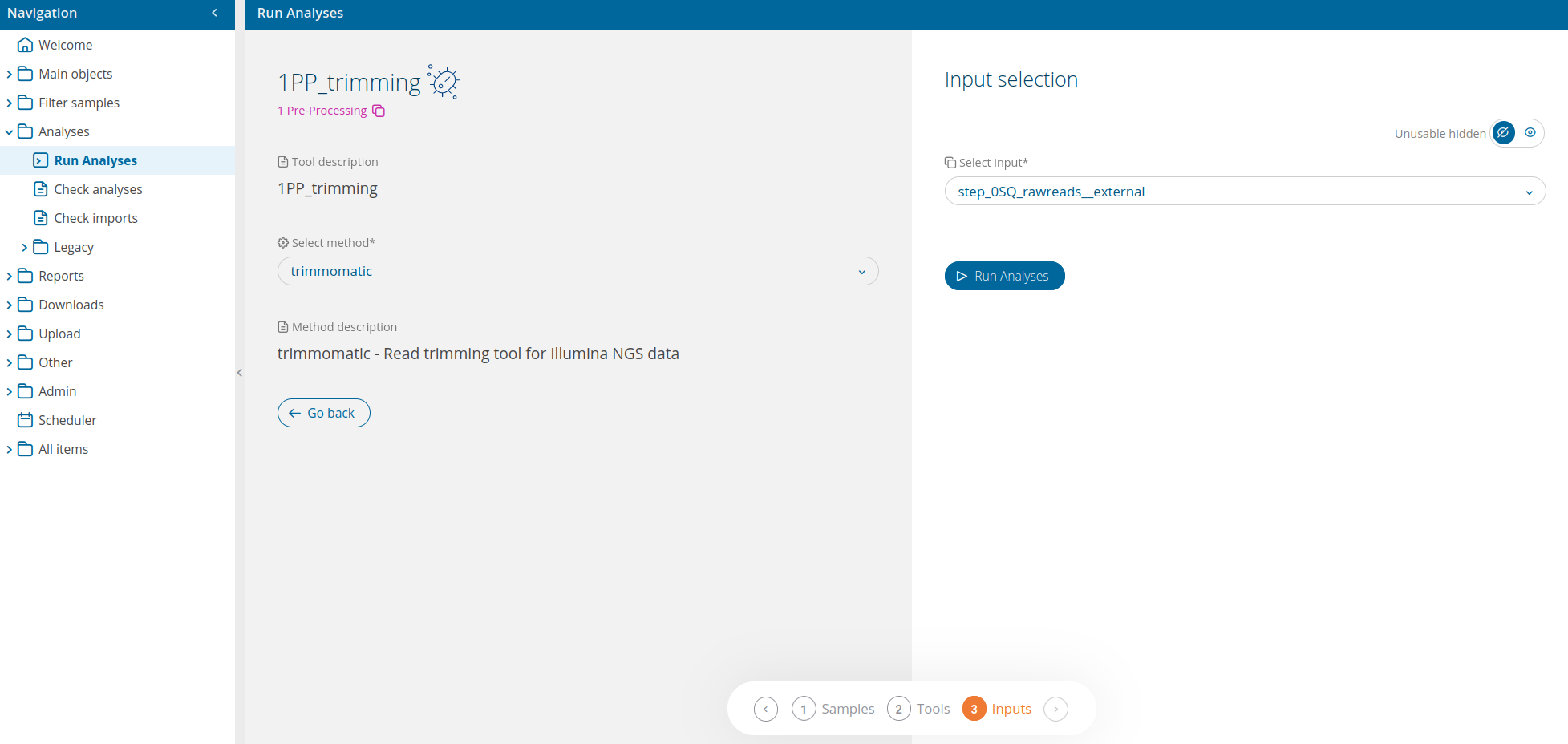
Once the analysis is launched, the page generates a link to the Check analysis section to allow a check of the processus status. The system will send the user a notification both when the analysis is successfully started and when the operation is completed.
Result folder
To consult the guide on how to download files from the platform, please refer to the dedicated page.
The Result folder can be browsed by clicking the link available within the analysis card, in the Result data section. Inside the subsequent results folder, there are 3 subfolders:
- meta: (metadata), where the log and configuration files of the executed process are saved;
- qc: (quality check) where check quality files are saved. It also contains the two sub-folders meta and result. For this analysis, quality check is performed with fastqc. QC calculation is not performed when running the analyses with Seqkit;
- result: where the files containing the results produced by the analysis are saved.
The tables below show the lists of files present in the folders, based on the tool used, along with some useful information. Note that the file name will include the name of the program chosen for the analyses.
Trimmomatic
| File | Description | Location |
|---|---|---|
| DSXXXXXXXX-DTXXXXXX_ID_R1_trimmomatic.fastq | trimmed read 1 (R1) | folder: result |
| DSXXXXXXXX-DTXXXXXX_ID_R2_trimmomatic.fastq | trimmed read 2 (R2) | folder: result |
| DSXXXXXXXX-DTXXXXXX_ID_unpaired_trimmomatic.fastq | unpaired trimmed reads | folder: result |
| DSXXXXXXXX-DTXXXXXX_ID_R1_trimmomatic_fastqc.html | quality of reads R1 | folder: qc > result |
| DSXXXXXXXX-DTXXXXXX_ID_R1_trimmomatic_fastqc.zip | quality of R1 (zip file) | folder: qc > result |
| DSXXXXXXXX-DTXXXXXX_ID_R2_trimmomatic_fastqc.html | quality of reads R2 | folder: qc > result |
| DSXXXXXXXX-DTXXXXXX_ID_R2_trimmomatic_fastqc.zip | quality of R2 (zip file) | folder: qc > result |
| DSXXXXXXXX-DTXXXXXX_ID_unpaired_trimmomatic_fastqc.html | quality of unpaired reads | folder: qc > result |
| DSXXXXXXXX-DTXXXXXX_ID_unpaired_trimmomatic_fastqc.zip | quality of unpaired reads (zip file) | folder: qc > result |
fastp
| File | Description | Location |
|---|---|---|
| DSXXXXXXXX-DTXXXXXX_ID_fastp_R1.fastq.gz | trimmed read 1 (R1) | folder: result |
| DSXXXXXXXX-DTXXXXXX_ID_fastp_R2.fastq.gz | trimmed read 2 (R2) | folder: result |
| DSXXXXXXXX-DTXXXXXX_ID_fastp_unpaired.fastq.gz | unpaired trimmed reads | folder: result |
chopper
| File | Description | Location |
|---|---|---|
| filtered_reads.fastq.gz | trimmed long reads | folder: result |