
2AS_mapping
Introduction
2AS_mapping analysis performs the reference-based assembly (i.e. mapping) of sequences.

Run 2AS_mapping analysis
Once the analysis 2AS_mapping has been selected in the dedicated run analyses page, it will be possible to choose the bioinformatics software ("method") to use, among those available for the analysis. The available tools in this case are:
-
bowtie2 - an ultrafast and memory-efficient tool for aligning sequencing reads to long reference sequences.
Bowtie2 GitHub page: https://github.com/BenLangmead/bowtie2
-
iVar - computational package for viral amplicon-based sequencing
iVar GitHub page: https://github.com/andersen-lab/ivar
-
Snippy - Rapid haploid variant calling and core genome alignment
Snippy GitHub page: https://github.com/tseemann/snippy
Note: When using the snippy tool, it is essential that the selected sample has the 4AN_genes analysis associated with it (Prokka).
- medaka - a tool to create consensus sequences and variant calls, from Nanopore sequencing data.
Medaka GitHub page: https://github.com/nanoporetech/medaka
Note: medaka is an open-source tool developed by the Oxford Nanopore Technologies Ltd., to be used exclusively on sequencing data generated by Nanopore devices.
In the section dedicated to the parameter definition, it will be necessary to select a reference for the mapping, from the pop-up table accessible by clicking the "Select" button. The pop-up lists sequences of two types, both of which can be used as reference:
- fasta file reference: files imported from external databases - such as NCBI - (listed in the GenPat reference table: https://genpat.izs.it/cmdbuild/ui/#classes/T_REFERENCE/cards);
- the consensus sequence or the de novo assembly of a sample available in the platform (internal database).
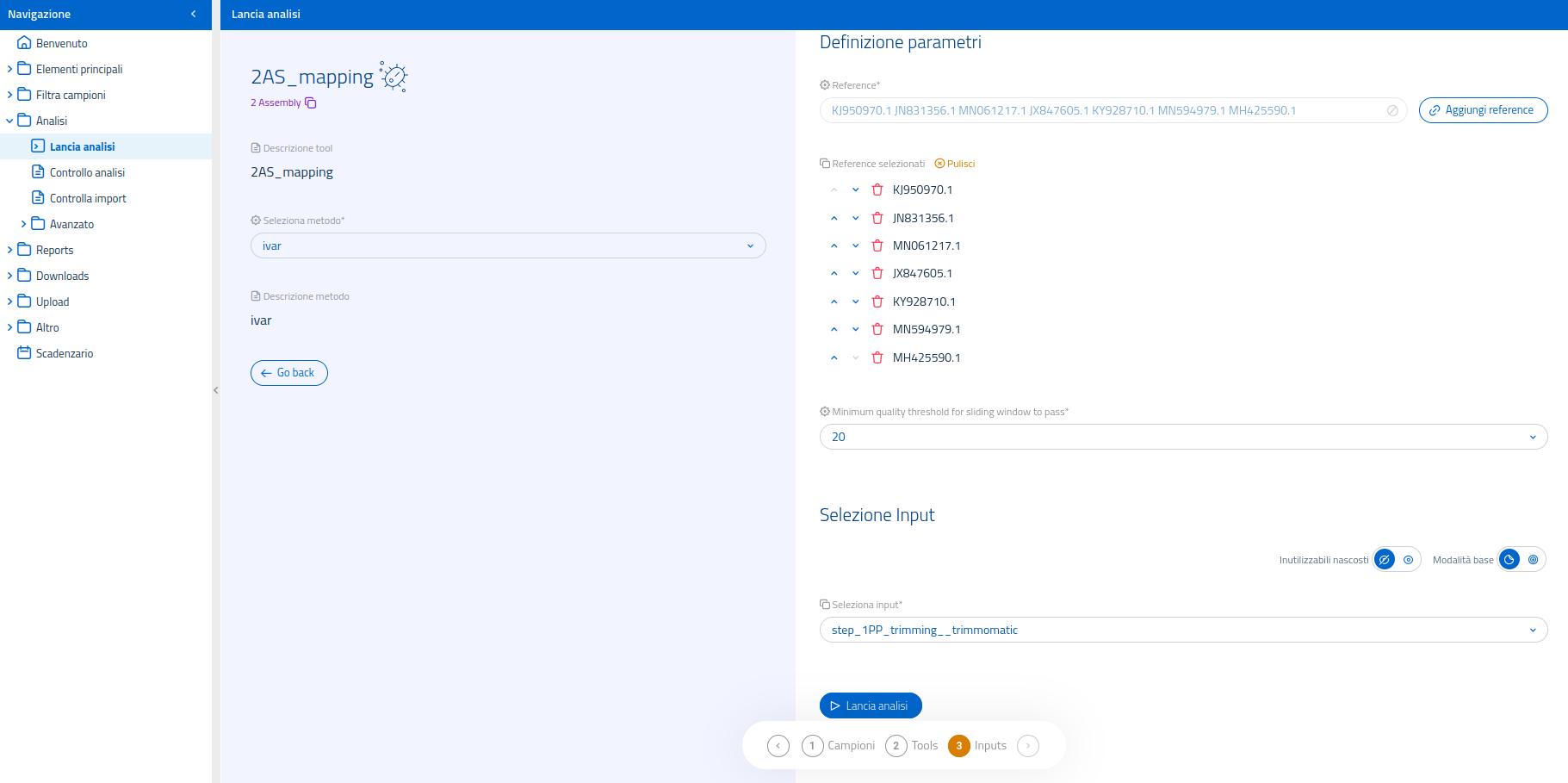
With the "Ivar" method, it is possible to select more than one reference (please, refer to the "Multiple references" section below).
The input selection interface provides the advanced input selection mode, to allow the use of inputs processed by different methods that were applied upstream in the analysis workflow.
The accepted inputs are the same as those that can also be used for the 2AS_denovo analysis:
- step_1PP_trimming
- step_1PP_hostdepl
- step_1PP_downsampling
- step_1PP_generated
- step_3TX_class
- step_4AN_AMR
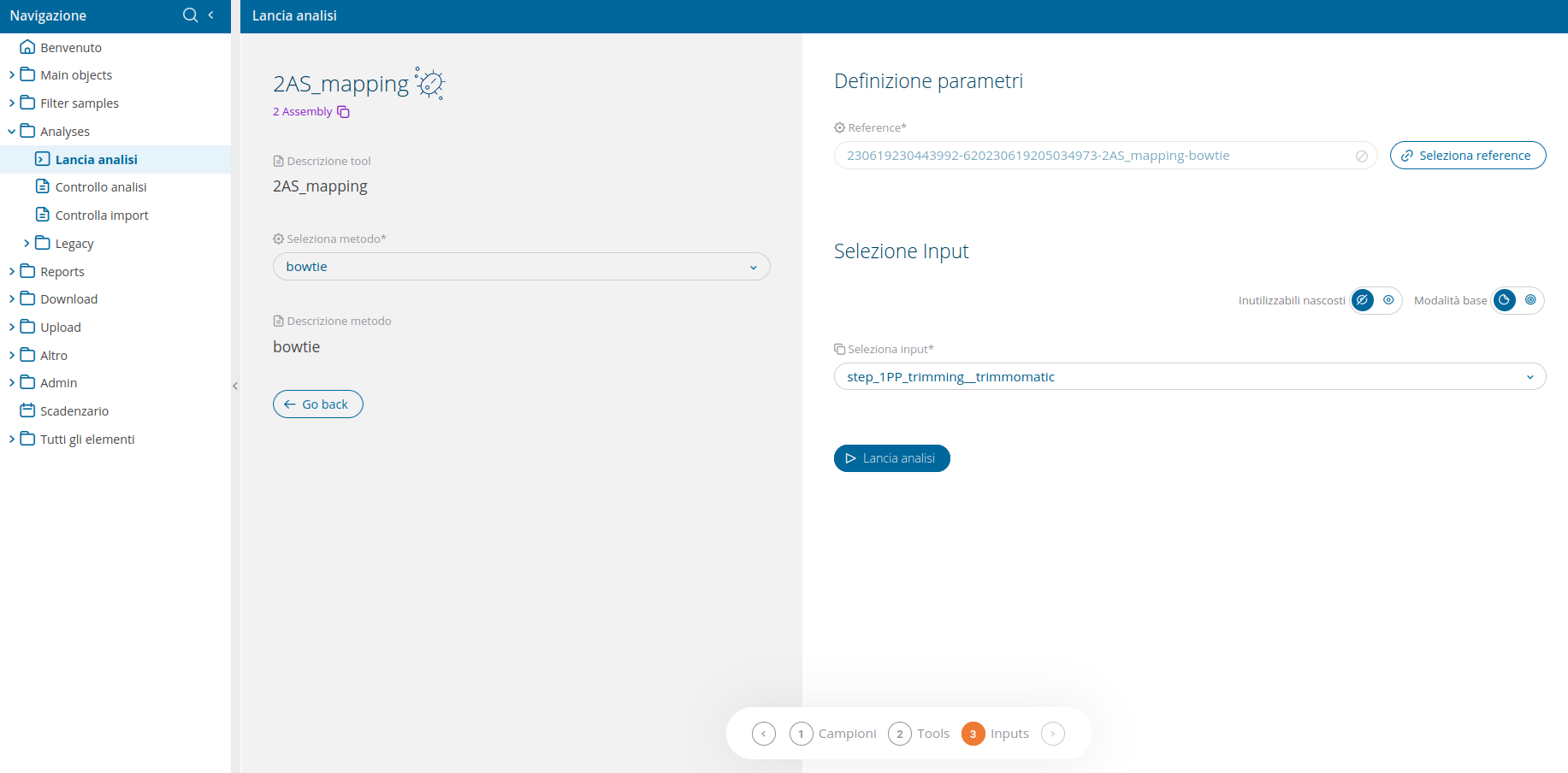
Once the analysis is launched, the page generates a link to the Check analysis section to allow a check of the processus status. The system will send the user a notification both when the analysis is successfully started and when the operation is completed.
Multiple references
If 2AS_mapping is performed with Ivar, it is possible to select more than one reference, as shown in the image below. A guide to the multiple reference selection system is available in the dedicated section of the wiki on running analyses.
Result folder
To consult the guide on how to download files from the platform, please refer to the dedicated page.
The Result folder can be browsed by clicking the link available within the analysis card, in the Result data section. Inside the subsequent results folder, there are 2 subfolders:
- meta: (metadata), where the log and configuration files of the executed process are saved;
- result: where the files containing the results produced by the analysis are saved.
The tables below list the files produced by the available tools for 2AS_mapping.
Bowtie2
| File | Description | Location |
|---|---|---|
| DSXXXXXXXX-DTXXXXXX_ID_bowtie_REFID.fasta | consensus file | folder: result |
| DSXXXXXXXX-DTXXXXXX_ID_bowtie_REFID.sorted.bam | alignment file in .bam (Binary Alignment Map) format | folder: result |
| DSXXXXXXXX-DTXXXXXX_ID_bowtie_REFID.sorted.bam.bai | .bai (BAM file index) file | folder: result |
| DSXXXXXXXX-DTXXXXXX_ID_bowtie_REFID.var.flt.vcf | file of identified variants in .vcf format | folder: result |
| DSXXXXXXXX-DTXXXXXX_ID_bowtie_REFID_coverage_plot.png | coverage distribution graph | folder: result |
Ivar and Snippy
Please note that using ivar includes running the tools snippy, samtools and finally ivar, whereas 2AS_mapping_snippy runs exclusively the software it is named after.
| File | Description | Location |
|---|---|---|
| DSXXXXXXXX-DTXXXXXX_ID_ivar_REFID.fasta | consensus sequence obtained with ivar (note:2AS-mapping_snippy does not produce this file) | folder: result |
| DSXXXXXXXX-DTXXXXXX_ID_vdsnippy_REFID.aligned.fa | reference version with - in positions with sequencing depth = 0(number of reads aligning at that position = 0) and N for depth between 0 and the minimum number of reads considered in the siet coverage (no variants are listed in this file) |
folder: result |
| DSXXXXXXXX-DTXXXXXX_ID_vdsnippy_REFID.bam | alignment file in .bam (Binary Alignment Map) format | folder: result |
| DSXXXXXXXX-DTXXXXXX_ID_vdsnippy_REFID.bam.bai | .bai (BAM file index) file | folder: result |
| DSXXXXXXXX-DTXXXXXX_ID_vdsnippy_REFID.bed | .bed (Browser Extensible Data) file | folder: result |
| DSXXXXXXXX-DTXXXXXX_ID_vdsnippy_REFID.consensus.fa | reference genome with representation of all variants | folder: result |
| DSXXXXXXXX-DTXXXXXX_ID_vdsnippy_REFID.consensus.subs.fa | reference genome with representation of substitution variants only | folder: result |
| DSXXXXXXXX-DTXXXXXX_ID_vdsnippy_REFID.txt | summary of the snippy run | folder: result |
| DSXXXXXXXX-DTXXXXXX_ID_vdsnippy_REFID.tab | variant table in .tsv format | folder: result |
| DSXXXXXXXX-DTXXXXXX_ID_vdsnippy_REFID.csv | variant table in .csv format | folder: result |
| DSXXXXXXXX-DTXXXXXX_ID_vdsnippy_REFID.filt.vcf | variants filtered by Freebayes | folder: result |
| DSXXXXXXXX-DTXXXXXX_ID_vdsnippy_REFID.raw.vcf | variants not filtered by Freebayes | folder: result |
| DSXXXXXXXX-DTXXXXXX_ID_vdsnippy_REFID.subs.vcf | table of substitution-only variants in .vcf format | folder: result |
| DSXXXXXXXX-DTXXXXXX_ID_vdsnippy_REFID.gff | variants in GFF3 format | folder: result |
| DSXXXXXXXX-DTXXXXXX_ID_vdsnippy_REFID.html | .html version of the .tab table of variants | folder: result |
| DSXXXXXXXX-DTXXXXXX_ID_vdsnippy_REFID.vcf | output file from Snippy (identified variants) in .vcf format (summary header + table) | folder: result |
| DSXXXXXXXX-DTXXXXXX_ID_vdsnippy_REFID.vcf.gz | snippy compressed .vcf output file | folder: result |
| DSXXXXXXXX-DTXXXXXX_ID_vdsnippy_REFID.vcf.gz.csi | bcftools index for the .vcf.gz file | folder: result |
| DSXXXXXXXX-DTXXXXXX_ID_vdsnippy_REFID_coverage_plot.png | coverage distribution graph | folder: result |
For further information on the files generated by snippy, their formats and their contents, please refer to the Snippy manual.
medaka
| File | Description | Location |
|---|---|---|
| DSXXXXXXXX-DTXXXXXX_ID_medaka_REFID.fasta | fasta file of the alignment | folder: result |
Data visualization
To evaluate the quality of the generated sequences, read alignments against the reference can be visualized using a dedicated software (i.e. Tablet, BioEdit and uGene) capable of reading .bam and .bam.bai files:
- Tablet (GNU/Linux, macOS, Windows): https://ics.hutton.ac.uk/tablet/download-tablet/;
- BioEdit (Windows): https://thalljiscience.github.io/;
- uGene (GNU/Linux, macOS, Windows): http://ugene.net/ugene/.