
4AN_genes
Introduction
4AN_genes performs the functional genome annotation, which identifies the possible encoded proteins and the ORFs.

Run 4AN_genes analysis
Once the analysis 4AN_genes has been selected in the dedicated run analyses page, it will be possible to choose the bioinformatics software ("method") to use, among those available for the analysis. The available tools in this case are:
-
Prokka - Tool to annotate genomes of bacteria, archaea and viruses.
Prokka GitHub page: https://github.com/tseemann/prokka
-
Pharokka - Annotation tool for bacteriophage genomes and metagenomes
Pharokka GitHub page: https://github.com/gbouras13/pharokka
Prokka tool
Prokka is generally used to annotate genomes of bacteria, archaea and viruses. Its parameters include:
- selecting a kingdom among:
- viruses;
- bacteria;
- archaea;
- and, in addition, mitochondria;
- selecting a reference genome;
- selecting the input analysis.
For Prokka, the advanced input selection mode is also available.
Accepted inputs can originate from:
- step_2AS_mapping
- step_2AS_denovo
- step_2AS_hybrid
- step_2AS_import
It will be necessary to specify the input sequences - whether derived from de novo assembly or from mapping - and the reference genome used for mapping, if the latter is selected as input.
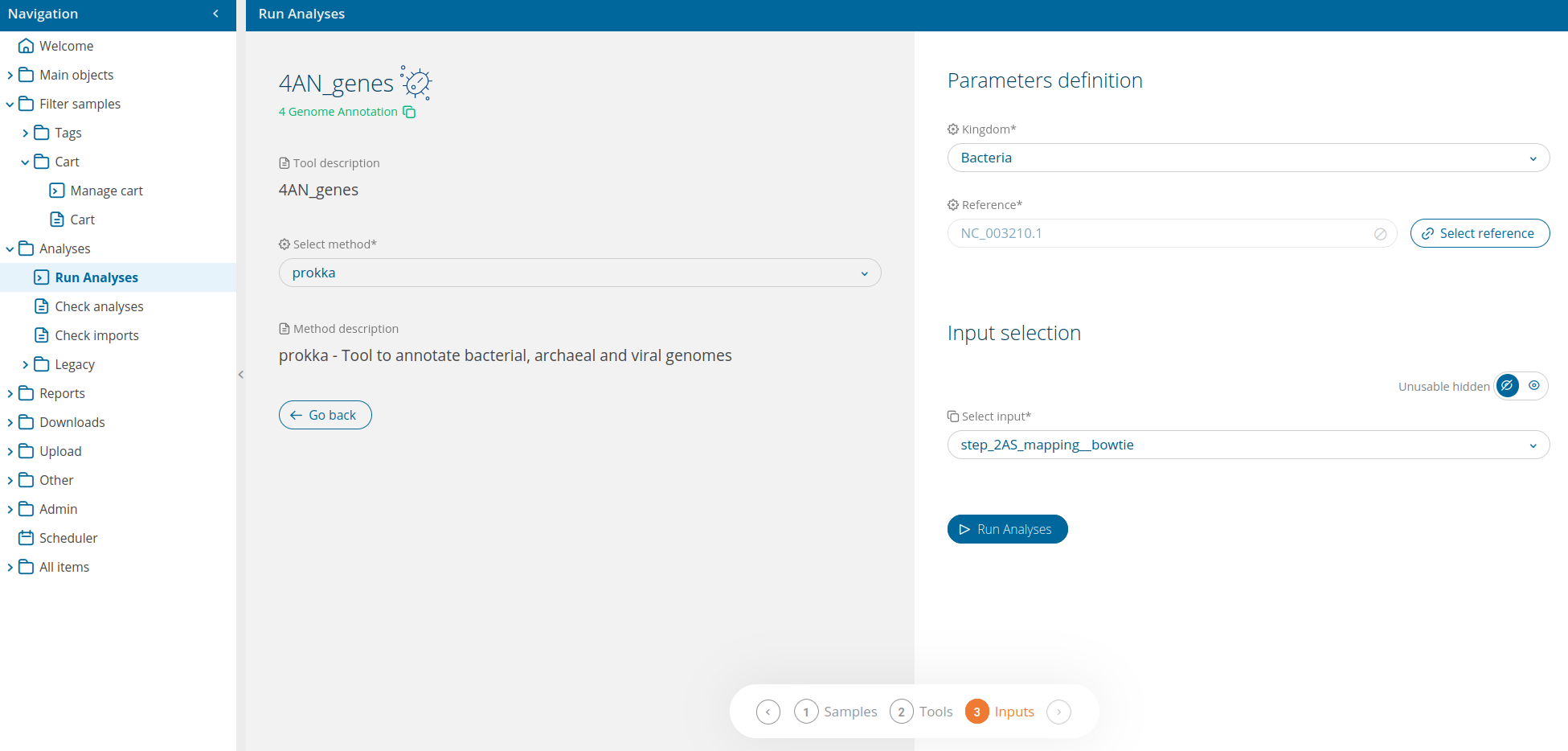
Pharokka tool
Pharokka is a tool developed specifically and exclusively for the annotation of bacteriophage genomes. The required parameters are only 2:
- the software to use for CDS prediction (the available tools are Phanotate and Prodigal; Phanotate is the default tool, as it is specific for prediction on the smaller phage genomes);
- the selection of the input analysis.
The advanced input selection mode is also available for Pharokka.
Accepted inputs can originate from:
In this case as well, it will be necessary to specify the reference genome used for mapping, if the latter is selected as input for the analysis.
Once the analysis is launched, the page generates a link to the Check analysis section to allow a check of the processus status. The system will send the user a notification both when the analysis is successfully started and when the operation is completed.
Result folder
To consult the guide on how to download files from the platform, please refer to the dedicated page.
The Result folder can be browsed by clicking the link available within the analysis card, in the Result data section. Inside the subsequent results folder, there are 2 subfolders:
- meta: (metadata), where the log and configuration files of the executed process are saved;
- result: where the files containing the results produced by the analysis are saved.
The tables below list the files contained in the folders, along with some useful information.
Prokka
The following table lists the file generated by Prokka.
| File | Description | Location |
|---|---|---|
| log_errore_controlli_esami.log | run's warning and error log | folder: results |
| metadata_samples.tsv | summary table in .tsv format of sample metadata | folder: results |
| results.csv | summary table separated by semicolon (";") containing sample IDs and information | folder: results |
| DSXXXXXXXX-DTXXXXXX_ID_prokka_REFID_result.err | report of inconsistencies and errors encountered during the run (text file) | folder: results |
| DSXXXXXXXX-DTXXXXXX_ID_prokka_REFID_result.faa | amino acid sequences from translation of identified coding genes (.faa format - fasta amino acid) | folder: results |
| DSXXXXXXXX-DTXXXXXX_ID_prokka_REFID_result.ffn | nucleotide sequences of identified coding genes (.fnn format - fasta nucleotide) | folder: results |
| DSXXXXXXXX-DTXXXXXX_ID_prokka_REFID_result.fna | nucleotide sequences of identified coding genes (.fna format) | folder: results |
| DSXXXXXXXX-DTXXXXXX_ID_prokka_REFID_result.fsa | sequences in .fsa format (fragment analysis data file) | folder: results |
| DSXXXXXXXX-DTXXXXXX_ID_prokka_REFID_result.gbk | output file in GenBank format | folder: results |
| DSXXXXXXXX-DTXXXXXX_ID_prokka_REFID_result.gff | output file in .gff format (General Feature Format) | folder: results |
| DSXXXXXXXX-DTXXXXXX_ID_prokka_REFID_result.log | run log of Prokka | folder: results |
| DSXXXXXXXX-DTXXXXXX_ID_prokka_REFID_result.sqn | file for GenBank submission in Sequin format | folder: results |
| DSXXXXXXXX-DTXXXXXX_ID_prokka_REFID_result.tbl | text file with information on sequence and loci | folder: results |
| DSXXXXXXXX-DTXXXXXX_ID_prokka_REFID_result.tsv | .tsv list of loci and proteins from mapped coding genes | folder: results |
| DSXXXXXXXX-DTXXXXXX_ID_prokka_REFID_result.txt | statistics on identified CDS | folder: results |
| proteins.faa | sequences of identified proteins in .faa format | folder: results |
For more details on files generated by Prokka, please refer to Prokka official manual.
Pharokka
The following table lists the files generated by Pharokka.
| File | Description | Location |
|---|---|---|
| DSXXXXXXXX-DTXXXXXX_ID_pharokka_REFID.gbk | GenBank file, in .gbk format, with sequence features | folder: results |
| DSXXXXXXXX-DTXXXXXX_ID_pharokka_REFID.gff | GenBank file, in .gff format, with sequence features | folder: results |
| DSXXXXXXXX-DTXXXXXX_ID_pharokka_REFID_cds_final_merged_output.tsv | .tsv tabular file containing the genome annotation | folder: results |
For more details on files generated by Pharokka, please refer to Pharokka official manual.