
1PP_downsampling
Introduction
Downsampling can be defined as a process of reducing read depth (vertical coverage), at specific positions or within certain regions of the genome, with the aim of decreasing the number of uninformative reads and improving the quality of the assembly and downstream analyses. BBnorm normalizes read depth using k-mer hashing.
Sequencing protocols can often lead to the accumulation of reads in a specific region of the genome. This excess of information, in these cases, can slow down downstream analyses, which are forced to process a larger volume of data, even though much of it is not informative. In these cases, downsampling allows avoiding prolonged computation times by discarding excess read pairs until a specified threshold is reached, that is, the desired vertical coverage.

Run 1PP_downsampling analysis
Once the analysis 1PP_downsampling has been selected in the dedicated run analyses page, it will be possible to choose the bioinformatics software ("method") to use among those available for the analysis. The available tool in this case is:
- BBnorm - Kmer-based error-correction and normalization tool.
BBnorm user manual: https://manpages.debian.org/unstable/bbmap/bbnorm.sh.1.en.html
In the parameter definition screen, it will be necessary to specify both the input reads and some additional parameters, used to determine the final vertical coverage desired for the genomes of the samples.
The input selection interface provides the advanced input selection mode. In fact, downsampling may be performed following upstream analyses that are different from one another:
- step_1PP_trimming
- step_1PP_hostdepl
- step_1PP_downsampling
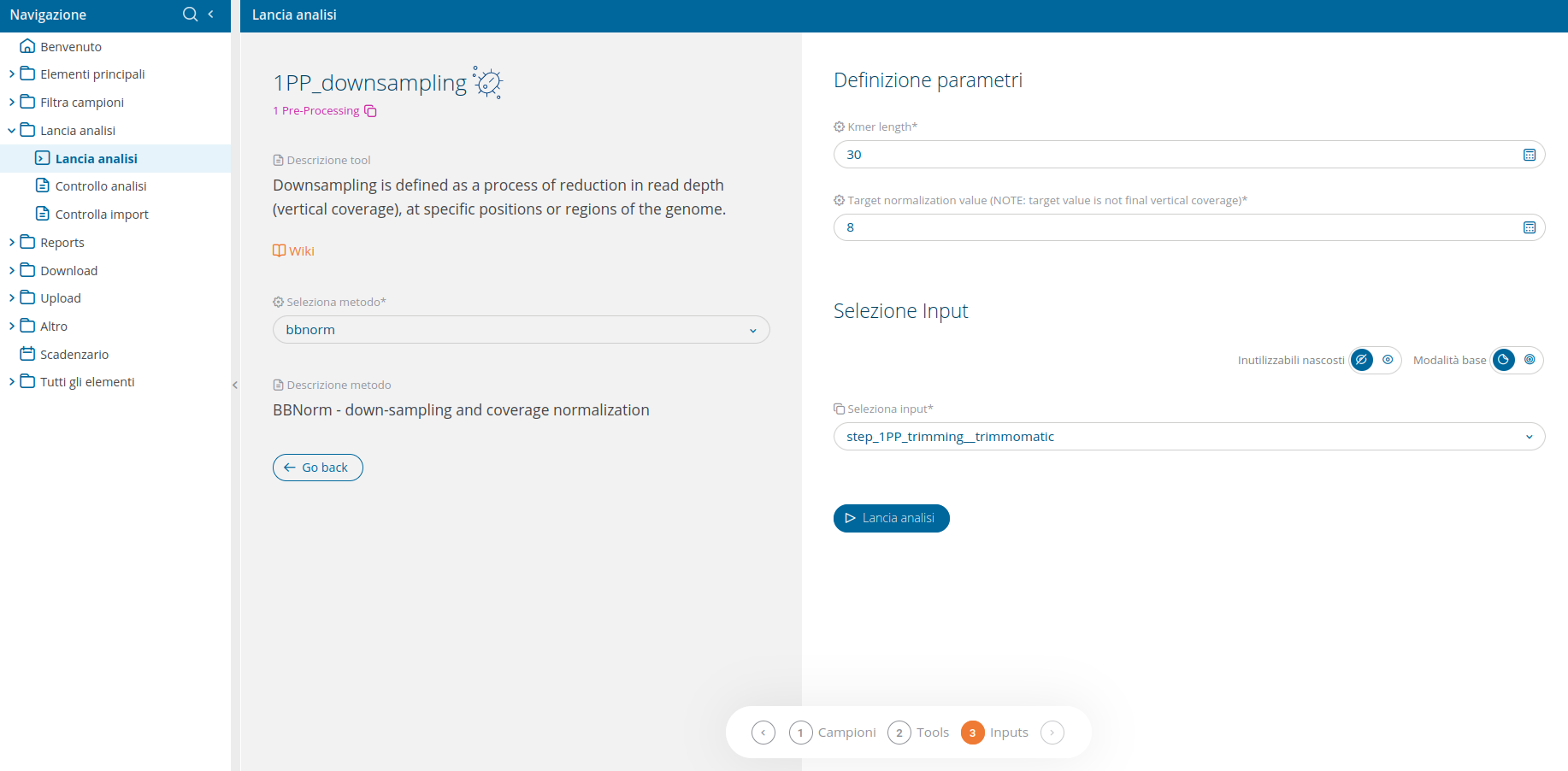
Once the analysis is launched, the page generates a link to the Check analysis section to allow a check of the processus status. The system will send the user a notification both when the analysis is successfully started and when the operation is completed.
Parameters
An overview of the parameters of BBnorm is available at the following link: https://manpages.debian.org/unstable/bbmap/bbnorm.sh.1.en.html.
The two parameters "kmer lenght" and "Target" depend on:
- the species of the sample (and, consequently, the genome lenght);
- for "Target", it depends on the kmer lenght to be used, as specified in the "kmer lenght".
Kmer lenght has a default value of 31. It supports any kmer lenght but a shorter lenght than 32 is recommended for improved tool efficiency.
Target indicates the normalization of the k-mers used by BBnorm to perform downsampling.
Warning: the "Target normalization value" parameter does not correspond to the final vertical coverage obtained by running the tool; rather, according to the BBnorm parameter guide, it controls the vertical depth of the k-mers used by the tool to normalize the reads.
Due to the way the software works, it is therefore necessary to experimentally determine the value of the second parameter, in relation to the first ("k-mer lenght") and the species.
Two examples for Listeria monocytogenes are listed below:
- species L. monocytogenes, kmer length = 30, target = 31 --> vertical coverage = 40X
- species L. monocytogenes, kmer length = 30, target = 8 --> vertical coverage = 10X
Result folder
To consult the guide on how to download files from the platform, please refer to the dedicated page.
The Result folder can be browsed by clicking the link available within the analysis card, in the Result data section. Inside the subsequent results folder, there are two subfolders:
- meta (metadata), where the log and configuration files of the executed process are saved;
- result, where the files containing the results produced by the analysis are saved.
The table below shows the list of the main files of interest present in the folders, along with some useful information.
| File | Description | Location |
|---|---|---|
| DSXXXXXXXX-DTXXXXXX_ID_bbnorm_kXX_tX_R1.fastq.gz | downsampled read 1 (R1) | folder: result |
| DSXXXXXXXX-DTXXXXXX_ID_bbnorm_kXX_tX_R2.fastq.gz | downsampled read 2 (R2) | folder: result |