
Metadata and .zip rules
In this section of the guide, the characteristics that files and metadata used for upload must have are described, together with the rules they must follow in order for validation to be successful.
Metadata
Please refer to the metadata glossary for a specific discussion of the individual fields in the metadata templates.
Metadata added from form
If metadata are added manually via the Add from form option, or if the cards of one or more samples are edited manually, the user is guided in selecting metadata values. Therefore, there are only 2 rules to follow to ensure proper validation of the metadata card:
- Use a correct Code (file name);
- Fill in at least the required fields for metadata.
Use a Code
The text to be entered in the "Code" field is the name of the fasta or fastq file you intend to upload.
- The code consists of the file name, without extension, that is in the zip archive being uploaded;
- The code and the file name must not contain spaces;
- For fastq files with paired-end reads, the code must not contain the forward or reverse read identifier (e.g. "_R1" or "_1") and must be unique (the metadata card applies to both reads).
Note The metadata template also provides the option to specify full file names (both reads for paired-end files, single file for single-end reads or fasta). If those columns are filled, the check will be performed on the full file names rather than only on the code.
Fill in required fields
Required fields can vary based on the type of sample being uploaded; for example, a research sample will have fewer required fields than an official sample, for which more metadata are required.
In general, the minimum required metadata may require you to:
- fill in the
codefield; - specify the sample type (official, research, etc.), the file type (fasta or fastq) and, in case of fastq, the sequencing platform technology (Illumina paired-end, Nanopore single-end, etc.);
- indicate species or material.
During validation, required fields with missing or incorrect values are highlighted with error messages.
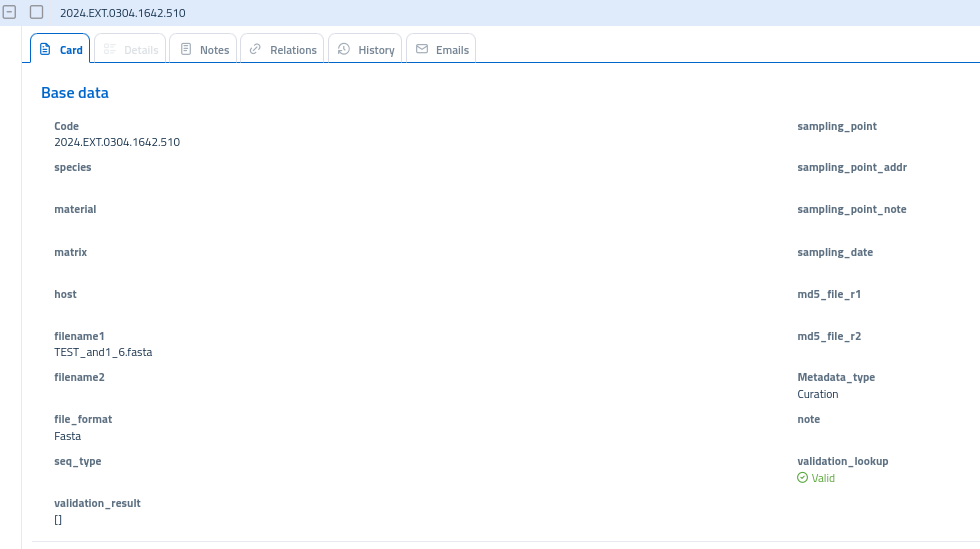
Tip By entering metadata from form or using the platform edit functions, fields such as species or material can be set through a dropdown menu or a specific table. In these cases, the selection is guided and ensures the correct code is entered.
Metadata added via file
Templates for tabular metadata submission files can be downloaded directly from the Metadata file templates section of the wiki page dedicated to Upload. The templates are available in both .tsv and .xls format.
Tip Templates can also be downloaded from the platform via the metadata upload modal (button
Add from file) and from the context menuof the upload page.
Required metadata
Each column of the metadata file corresponds to a field in the metadata card.
In the metadata file template, the second row serves as an example for formatting and the type of text to enter in each cell.
The following indications apply to the metadata fields required by the template:
- The
metadata_typefield can take the following values:official- (official samples upload);research- (samples uploaded for research purposes).
Each user profile can upload specific types among those listed above and the system will not accept uploads of types different from those allowed. Some metadata are required only if the upload is for official samples (
metadata_type=official).
- The
species,material,host,matrixandsampling_pointfields must not be filled with taxonomic names or textual descriptions, but with the corresponding code in the platform tables.
Tip Metadata code tables can be consulted under
Main items > Metadatain the platform side menu. Additional information is available in the Metadata section of this Wiki.
- The
read_formatfield can take the values: fasta;illumina_paired(paired-end fastq files from Illumina devices);ion(single-end fastq files from Iontorrent device);nanopore(single-end fastq files from Nanopore device).
For all other indications and restrictions, refer to the information provided in the section Metadata added from form - Required fields and in the metadata glossary.
Sequence files
Files in fasta format are recognized if they have the .fasta or .fa extension. Similarly, fastq files are recognized if they have the .fastq.gz or .fq.gz extension.
Note: Compression of fastq files in
.gzformat is mandatory. Fasta files are accepted with or without.gzextension.
Zip archive
The archive must be in .zip format. During upload, the system checks metadata cards and associates them with the corresponding samples. For the upload to succeed, the name of each fasta or fastq file (excluding the file extension) must match the value of the code metadata entered during metadata upload.
If at least one or only some of the samples in the zip archive match the codes in the validated cards, the upload process will be completed only for those files and with warnings.
If the zip archive contains files whose names do not match any of the codes entered in the validated metadata cards, the upload request will result in failure.
Tip Files in the archive can also be inside a folder/subfolder structure, provided it does not exceed 10 levels of depth.